

E-commerce
Using advanced Device Detection and IP Intelligence tools, 51Degrees helps retailers to better understand the traffic to their site for personalization, optimization, analytics, and bot management.
51Degrees helps e-commerce businesses to drive increased conversion performance through enhanced data, analytics, and website optimization, as well as protecting retailers' content from bots.
Talk to usOur customers
We work with retailers, agencies, and e-commerce platform providers to enhance retailers' user data and to identify bots and non-human website traffic.
Whether you want to get a better understanding of your customers' location or the devices they're using, or you want to protect proprietary product and pricing information from bots, 51Degrees' products can help you to meet your business goals.
Our products
51Degrees offers a range of products intended to boost e-commerce performance and protect retailers' IP.
- Device Detection. By understanding the device that is being used to access your site, you can optimize functionality from product pages to the checkout by serving content that works most effectively on that handset or computer. Additionally, by understanding key data points about the device, such as OS, age, or value, retailers can personalize product recommendations.
- IP Intelligence. 51Degrees' IP Intelligence gives you a nuanced understanding of a shopper's approximate location, enabling you to personalize content, from local offers to a localized checkout page, and feed your analytics with relevant location data. Unlike legacy IP providers, 51Degrees offers deep insight into the precision and confidence of location results, enabling you to make more informed business decisions about how to use that data.
- Bot management. Managing bots can be a complex task for e-commerce businesses. Many bots are just there to steal your data for rivals or price comparison. Some of these will identify themselves but others will hide themselves and attempt to look like a human user. 51Degrees' crawler detection and Human Confidence let you manage bots with nuance. The crawler detection properties can help you filter out the AI bots that identify themselves and manage them accordingly. Human Confidence gives you a High, Medium, or Low confidence that a visit is from a human, so High confidence visits can go straight through to the site while others can be redirected.


Human Confidence
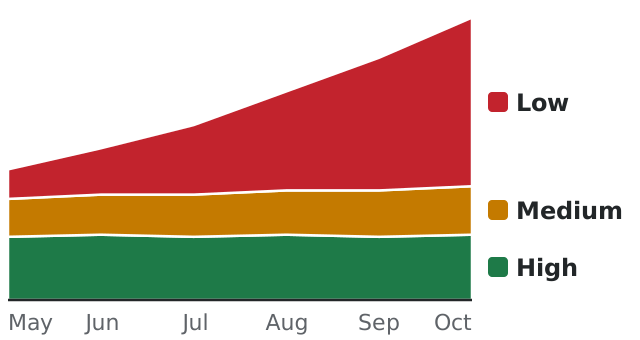
Boom, or bots? Traffic up this month? Before you celebrate, check how much of it is people. Human Confidence rates every visit High, Medium, or Low.
Don't you want to know? Put the rating in the analytics you already use and the chart below is what you'd see, month by month. Then decide what each kind of visit gets.
| Value | Meaning | |
|---|---|---|
 |
High | High confidence that a person is reading the page. |
 |
Medium | Mixed signals. Could be a person, could be a script. |
 |
Low | Almost certainly no person is reading it. |
90%
of a travel website's traffic from new visitors was AI crawlers and agents by August this year. In June it was under 1%.
47%
of the visits to one website in one week still weren't human, after the crawlers that declare themselves were taken out.
What the scrapers are after
At the travel website, a few of those AI visitors looked like agents planning trips for real people. Most looked like they were checking prices and availability, probably for a rival or a price-tracking service.
A scraper copies your catalog, prices included, and takes it to a rival. Your analytics counts it as a shopper who didn't buy. Scrapers run real browsers now, so they look like shoppers, and no list of crawler names will catch them. That's the point of them.
Be found, not copied.
Search engines are bots, and you want them. They give their names, our crawler detection recognizes them on every plan for free, and a robots.txt from us tells them what they may index. AI agents are different again. One buying for a customer may be about to pay. Some big retailers welcome them and others block them. What those agents see on your website is up to you.
How you'd use it
Your developers add it. You decide the rest.
1
Add it to your pages
Your developers add our script and every visit comes back rated. The "recipe" below and our quick start show them where it goes.

2
Look at the numbers
Start in your analytics. Nobody visiting notices, and after a few weeks you'll know how much of your traffic is people. We did it in that order on our own website.
3
Decide what each visit gets
The obvious start is to let the search engines in and show prices to High. For Low, the choice is between a page made for AI, without the prices, and no page at all. Medium can be asked to sign in first if the scraping is costing you.
Are you counting the scrapers?
Scrapers read every page and buy nothing, and you still pay the hosting bill to serve them. With the rating on every visit, the shoppers see your prices and the scrapers get a page with no prices on it. Your reports start counting buyers.
Human Confidence comes with Pro, our cloud service, bought online with a card, or with Bespoke, which runs on your own servers in a Docker container and starts with a conversation.
4 ways to improve your e-commerce website
Use Human Confidence to decide when to show prices
Some AI agents visit for a person who may want to buy. Scrapers copy product and pricing information for another business. Use Human Confidence to decide which visits get your prices. You can let High through and withhold prices from Low, or serve no page. For Medium, you can ask the visitor to sign in if scraping is costing you.
If nine of the ten browsers in a report are bots, there's only one shopper in that count. Record Human Confidence with each visit to see how much of your traffic is likely to be human.
Who it serves. Retailers deciding how to handle AI visitors.
Pairs well with Suspicious traffic management, when you need to investigate the traffic further.
Integration time. 30 minutes in any Pipeline API integration.
Ingredients, 5
- HumanConfidence
- IsCrawler
- CrawlerName
- CrawlerUsage
- IsArtificialIntelligence
Hero ingredient. HumanConfidence Scraper or shopper? Adapt to every request.
- Read Human Confidence on every page view
- Let High visits see the prices
- For Low, withhold the prices or serve no page
- Decide which AI agents you welcome. Some are shopping for a real person.
Chef's tip. Keep the rating in the session for half an hour, so you aren't asking the cloud on every page.
Check for bot traffic in your analytics and spending
Use the crawler properties to identify visitors that give their name and purpose, then handle them according to your robots.txt. For visits that aren't named crawlers, use Human Confidence to decide what they can see and how to count them in analytics. The network properties let you review traffic from a data center, VPN, or proxy.
Who it serves. Teams checking bot traffic in analytics and ad spending.
Pairs well with Spot the fake, for a closer look at the device in a suspicious request.
Integration time. 30 minutes in any Pipeline API integration.
Ingredients, 10
- IsCrawler
- CrawlerName
- CrawlerUsage
- CrawlerProductTokens
- IsArtificialIntelligence
- HumanConfidence
- IsVPN
- IsProxy
- IsHosted
- HumanProbability
Hero ingredient. HumanConfidence Use the rating to decide whether a visit should see your prices.
- Check IsCrawler on every request
- Filter named crawlers by name and usage
- Use IsArtificialIntelligence to identify AI traffic
- Use Human Confidence to review visits that aren't named crawlers
Chef's tip. Crawler detection is free on every plan. Use it to handle the visitors that identify themselves before reviewing the rest.
Reduce form filling at the checkout
An IP lookup gives you an approximate location, along with the local currency, language, and time zone. Use it to suggest address details and set defaults for the checkout. This can cover shipping and tax as well as the language of the page.
Who it serves. Retailers looking to reduce cart abandonment.
Pairs well with Know your shopper, for device data you can use to personalize the visit.
Integration time. One afternoon in your checkout flow.
Ingredients, 11
- Country
- CountryCode
- State
- Town
- Latitude
- Longitude
- AccuracyRadiusMin
- CurrencyCode
- LanguageCode
- TimeZoneIana
- ConnectionType
Hero ingredient. CurrencyCode Use the currency code to set a default for the checkout.
- Look up the visitor's approximate location from their IP address
- Suggest country, state, and town in the address form
- Default the currency, shipping options, and tax to match
- Show the checkout in the customer's language
Chef's tip. An IP location can be wrong. Let the customer change the country and other suggested details.
Use device data to inform your promotions
Compare basket size and conversion across device price bands in your analytics. Include model and device age when you review the results, then use what you learn to choose promotions to test.
Who it serves. Merchandising and analytics teams.
Pairs well with Frictionless checkout, when you also want to reduce form filling at checkout.
Integration time. 30 minutes to add the dimensions to your analytics.
Ingredients, 10
- PriceBand
- ReleaseYear
- ReleaseAge
- HardwareModel
- HardwareName
- ScreenInchesDiagonal
- PixelRatio
- PlatformName
- PlatformVersion
- BrowserName
Hero ingredient. PriceBand Group visits by the device's price band to compare basket size and conversion.
- Add device price band and model as dimensions in your analytics
- Compare basket size and conversion across device price bands
- Choose promotions based on the sales patterns you find
- Test the promotions and review the results
Chef's tip. Before changing what visitors on $1,200 and $120 phones see, compare their basket sizes in your analytics.
Choose what to improve on your website
Each recipe explains the business use, followed by the properties and steps your developers need. It also includes a link to create a Resource Key.